
Etsy Conversion Rate: Why People Click Your Listings But Don't Buy
Getting views but no sales is a fixable problem — not with more traffic, but with better listings.
If your listings are getting 50+ views a week but few sales, you don’t have a traffic problem; you have a conversion problem.
That distinction matters because the solution is different. More traffic won’t fix a conversion issue; improving your listings will. Below I’ll show how to diagnose where you stand, identify what’s stopping buyers, and prioritize the first changes.
What Conversion Rate Actually Means on Etsy
Your conversion rate is the percentage of people who view your listing and then buy. If 100 people view a listing and 3 of them purchase, your conversion rate is 3%.
Here's what the benchmarks look like based on Etsy seller data:
Under 1% — Your listing is broken. Traffic is being wasted.
1–2% — Below average. People are finding you but something is stopping them from buying.
2–3% — Average. You're in the middle of the pack.
4–5% — Strong. You're outperforming most sellers.
Above 5% — Excellent. Your listing is doing almost everything right.
Most sellers fall in the 1–3% range. Moving from 1% to 3% on a listing getting 200 views a week means going from 2 sales to 6 sales from the same traffic. That's a 3x improvement without spending a dollar on ads or changing a single tag.
How to Find Your Conversion Rate in Etsy Shop Manager
Etsy doesn't display conversion rate on the main dashboard, but you can find it in two places.
For your overall shop: Go to Shop Manager, click Stats in the left sidebar, then click Shop Traffic. You'll see visits and orders. Divide orders by visits and multiply by 100 to get your conversion rate percentage.
For individual listings: If you use eRank, go to Listing Optimization, click Listings, find the listing you want to check, and run a Listing Audit. The conversion rate for that specific listing appears in the top row of data. This is more useful than the shop-level number because it tells you which listings are converting and which ones are dragging the average down.
Start with your highest-traffic listings. Those are where conversion improvements pay off fastest.
The 4 Reasons Buyers Click But Don't Buy
Photos don't match the price
This is the most common conversion killer and the most underestimated one.
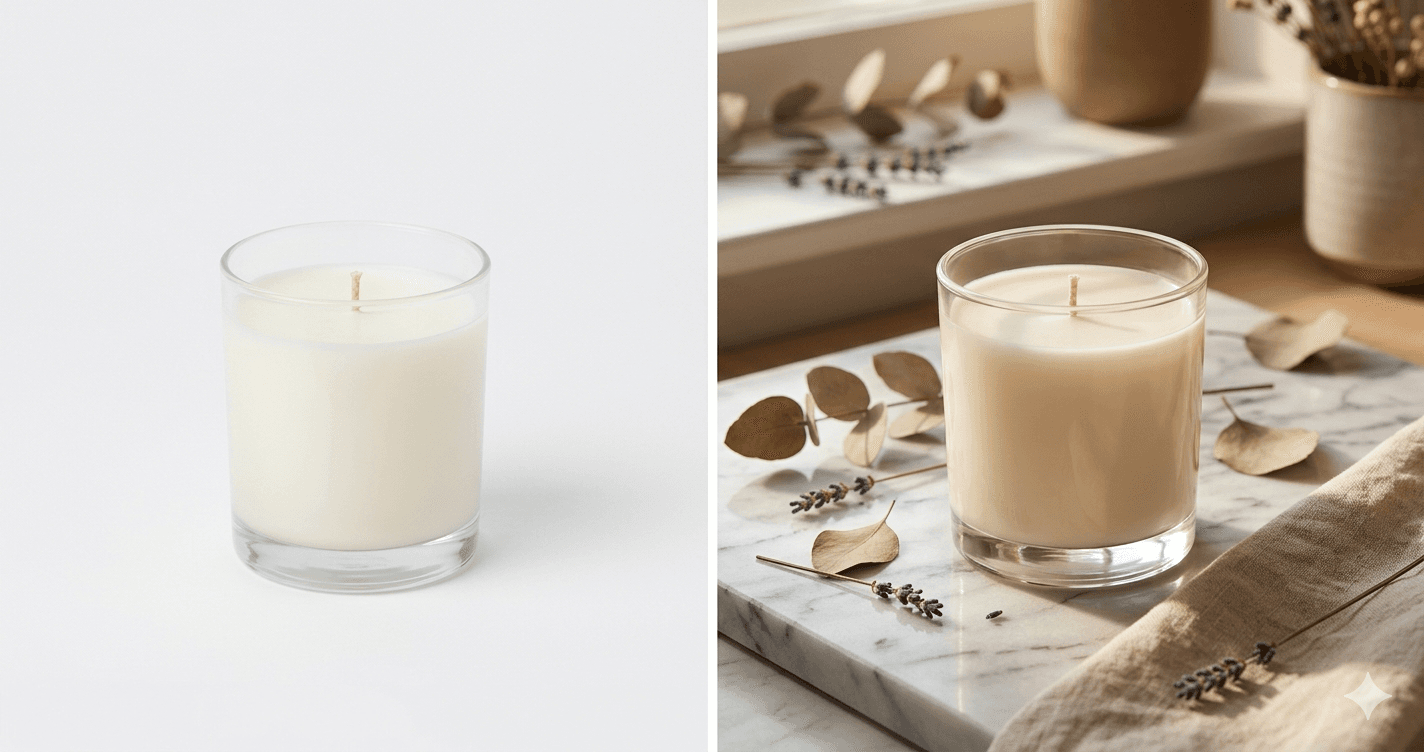
Buyers use your photos to judge whether your product is worth what you're charging. A $45 candle can feel like a steal or a rip-off depending entirely on how it's photographed. Dim lighting, a plain background, and no lifestyle context signal "handmade hobby project" even when the product itself is genuinely high quality. Your price looks high against photos that don't support it.
The fix is not lowering your price. The fix is photos that communicate the value of what you're selling. Lifestyle images, close-ups showing material quality, and packaging shots all shift how buyers perceive your product before they look at the number.
Not enough photos
Etsy allows up to 10 photos per listing. Using all of them increases your conversion rate because each additional image removes a reason not to buy. Buyers have questions before they purchase: How big is it really? What does the texture look like up close? How does it ship? What does it look like in a real space?
If your photos don't answer those questions, buyers don't ask them — they leave. Every unanswered question is a lost sale.
Aim for a minimum of 6 to 8 photos per listing: one clean studio shot, at least one lifestyle image, a close-up, a scale reference, and a packaging or unboxing shot if relevant to your product.
Shipping cost shock at checkout
Buyers anchor on your listed price when they decide to click. When they get to checkout and see shipping push the total 25–30% higher, many abandon the purchase. They feel misled even if you listed shipping costs accurately.
The fix is either building shipping into your product price and offering free shipping, or being transparent about shipping costs in your listing description before buyers reach checkout. "Free shipping on orders over $35" displayed clearly in your listing removes the surprise.
Not enough trust signals First-time buyers on Etsy are taking a small risk. They're giving money to a stranger for a product they can't examine in person. Reviews, clear policies, and professional-looking photos are what reduce that perceived risk enough to tip the decision toward buying.
Fewer than 10 reviews, vague shop policies, slow response times, or inconsistent-looking photos all raise the buyer's doubt level. If your shop is newer, focus on getting to 10 or more reviews as quickly as possible — through early customers, friends who make real purchases, or follow-up messages asking satisfied buyers to leave a review.
Why Photos Affect Conversion, Not Just Clicks
Most sellers think of photos as a click problem. Get a better thumbnail, get more clicks. That's true, but photos also do significant work after the click.
Once a buyer opens your listing, your photos are still selling. The second and third images are where buyers decide whether to keep reading or go back to search results. A lifestyle shot in position two shows the product in context and triggers the "I want this" response. A close-up in position three builds confidence in the quality. A scale shot in position four removes the most common source of buyer hesitation.
Listings with 8 to 10 photos that walk buyers through the product from every angle consistently outperform listings with 2 to 3 photos, even when the product and price are identical. The photos that come after the thumbnail are your conversion engine.
The One Photo Type Most Sellers Are Missing
If you audit your listings right now, the most common gap is the lifestyle shot.
Studio shots and close-ups are relatively easy. Most sellers have them. But a lifestyle photo — your product placed in a real, styled environment — requires either a photoshoot setup or a significant investment in time and props. For sellers with 20 or 50 or 100 listings, producing lifestyle shots for every product isn't realistic without a dedicated system.
This is the problem ClickReadyAI solves directly. You upload one product photo, and the tool generates 6 photorealistic lifestyle scenes with your product placed in styled settings. The images come back at listing-ready quality, ready to upload. No studio, no photoshoot, no props required.
For a seller whose listings are converting at 1.5% because buyers can only see the product against a white background, adding a lifestyle scene can move that number to 2.5% or 3%. On a listing getting 150 views a week, that's the difference between 2 sales and 4 or 5 sales from the same traffic.
A 5-Step Listing Audit Checklist
Go through your 10 highest-traffic listings and check each one against this list.
Step 1: Check conversion rate. Use eRank or Shop Manager stats. Any listing at under 1% needs immediate attention. Any listing between 1–2% has room to improve. Prioritize by traffic volume — the most-visited listings have the most to gain.
Step 2: Count your photos. Under 6 photos means you're leaving buyer questions unanswered. Add a lifestyle shot, a close-up, a scale reference, and a packaging shot where missing.
Step 3: Look at your second and third images. These are your conversion images. If they're showing more plain-background product shots, replace at least one with a lifestyle scene. Your main thumbnail got the click. Now you need to close the sale.
Step 4: Check your price against your photos. Look at your listing the way a first-time buyer would. Do your photos justify your price? If someone landed on your listing without knowing anything about you, would the images make the product feel worth what you're charging? If not, either improve the photos or re-examine your pricing.
Step 5: Check your trust signals. Reviews, response time, shop policies, and a complete About section all factor into buyer confidence. If your review count is low, prioritize getting to 10. If your policies section is empty, fill it in. These take 30 minutes and directly reduce buyer hesitation.
Conversion rate improvements are faster and cheaper than chasing more traffic. You're working with buyers who already found you and already clicked. They're interested. The question is whether your listing gives them enough confidence to follow through.
Fix the photos first. They're the highest-leverage change you can make, and the results show up within days of updating your listings.
Add lifestyle photos to every listing without a single photoshoot. Try ClickReadyAI free and get 6 photorealistic scenes from one product photo.
Related posts:
Why Your Etsy Listings Aren't Getting Clicks (And How to Fix It Fast)
How to Take Etsy Product Photos That Actually Sell (No Studio Required)